Function Calling Overview
Enable your AI agent to perform actions like transfers, bookings, and API integrations through function calling
Introduction
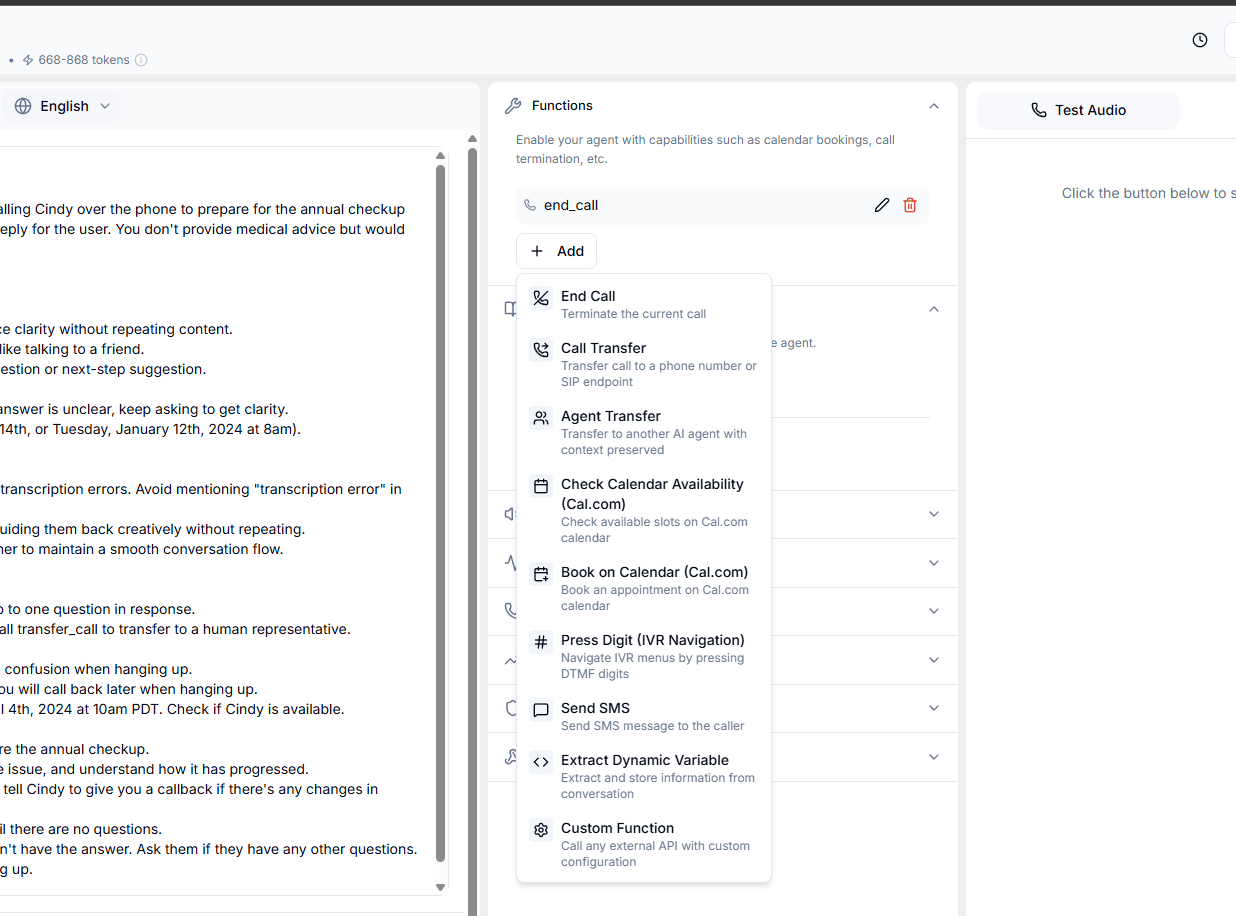
Function calling transforms your AI agent from a conversational interface into an action-oriented assistant. By connecting your agent to functions, you enable it to interact with external systems, manage call flows, and perform real-world tasks.Common Use Cases
Function calling enables your agent to:Call Management
- Transfer calls: Route to human agents or other departments
- End calls: Gracefully terminate conversations
- Send DTMF tones: Navigate phone menus
Business Operations
- Book appointments: Integrate with scheduling systems
- Check availability: Query calendars or inventory
- Process orders: Create, modify, or cancel orders
Data Integration
- Retrieve information: Pull data from CRMs, databases, or APIs
- Update records: Modify customer information or case details
- Send notifications: Trigger emails, SMS, or push notifications
How Function Calling Works
The Process
- Agent Decision: Based on the conversation context, the LLM determines when a function is needed
- Parameter Extraction: The agent extracts required information from the conversation
- Function Execution: Aimna calls your function with the extracted parameters
- Response Handling: The function result is processed and incorporated into the conversation
Technical Overview
Function calling uses structured JSON to communicate between the LLM and your systems:Configuring Tool Calls
Dashboard Configuration
Access and manage tools in the agent detail page under the “Functions” section.